A shared place to shape story.
Finish in Premiere.
A shared place
to shape story.
Finish in Premiere.
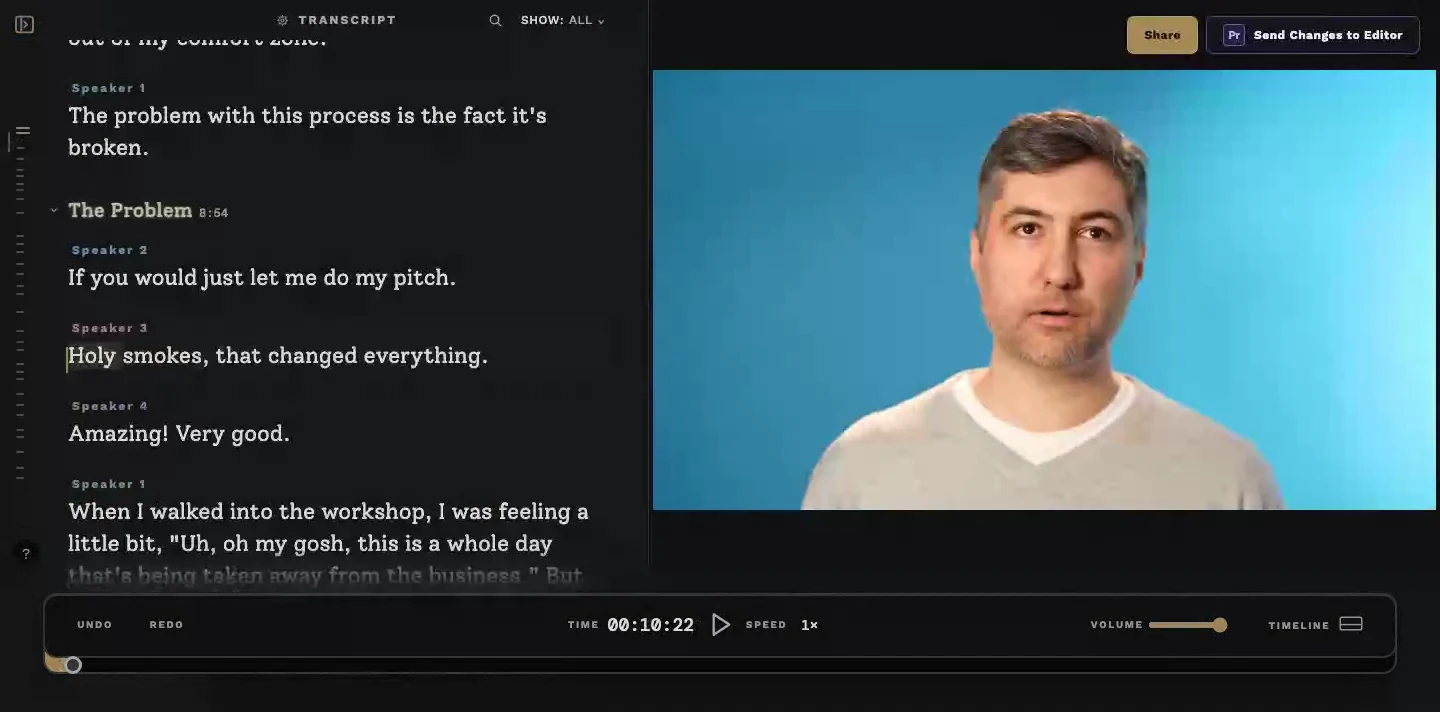
Proof lets the whole team craft the story together in text.
Send changes back to Adobe Premiere Pro for finishing.
Less back and forth. More time making the work great.
Proof lets the whole team
craft the story together in text.
Send changes back to
Adobe Premiere Pro for finishing.
Less back and forth.
More time making the work great.
No credit card required · Includes 5 seats
Send this approved cut back to the editor for finishing in Premiere.
Cut and rearrange sections of the transcript, watch the result, and work through feedback together.


Keep your process.
Upgrade the revision cycle.
Start in Premiere, shape the story together in Proof, then return to Premiere for the finishing work.
Keep your process.
Upgrade the
revision cycle.
Start in Premiere, shape the story together in Proof, then return to Premiere for the finishing work.
Your cuts and rearrangements get synced to Premiere with all cuts, rearrangements, and comments. All clip-level effects, color correction, and automation are preserved, while your original sequence stays untouched.
Proof brings everyone into the story.
Shape the story in text. See it become video.
Shape the story in text. See it become video.
Edit, rearrange, and refine your story directly in the transcript. No editing software to learn. No need to rebuild the edit from scratch.
Edit, rearrange, and refine your story directly in the transcript. No editing software to learn. No need to rebuild the edit from scratch.
Edit the story like a document
Cut, move, and rearrange sections as easily as editing a document.
Cut, move, and rearrange sections as easily as editing a document.
Navigate long-form content faster
Navigate long-form
content faster
Auto-generated chapters help you find the moments that matter and understand the shape of the story.
Auto-generated chapters help you find the moments that matter and understand the shape of the story.
Try the story before you commit to the timeline
Experiment with cold opens, pacing, dialogue, and structure before asking an editor to solve it in Premiere.
Experiment with cold opens, pacing, dialogue, and structure before asking an editor to solve it in Premiere.
Work together in real time
Bring the right people into the process so creatives, producers, editors, and clients can shape the story together.
Bring the right people into the process so creatives, producers, editors, and clients can shape the story together.
A faster, more human
revision cycle
A faster,
more human
revision cycle
A faster, more human
revision cycle
Everybody wins
See how Proof creates value for everyone involved in the edit.
See how Proof creates value for everyone involved in the edit.
See how Proof creates value for everyone involved in the edit.

Find the story together.
Test structure, pacing, and flow with the people closest to the material. Bring a clearer direction into the edit, with fewer rounds of back and forth.
Where Proof stands out
Where Proof stands out

Frame.io

Descript

Proof
Text-based story editing
Frame.io
✕
No
Descript
✓
Yes
Proof
✓
Yes
Collaborative
editing
Frame.io
—
Comments only
Descript
✓
Yes
Proof
✓
Yes
Timestamped
comments
Frame.io
✓
Yes
Descript
✓
Yes
Proof
✓
Yes
Edit without uploading all raw footage
Frame.io
—
Review only
Descript
✓
Imported files
Proof
✓
Sequence export
Non-destructive
Premiere workflow
Non-destructive
Premiere
workflow
Frame.io
—
Review only
Descript
✕
No*
Proof
✓
Yes
Multicam timeline support
Frame.io
—
Review only
Descript
~
Limited*
Proof
✓
Yes
Frame.io provides review and comments, not timeline editing. Descript can edit imported files without your entire raw-footage library.
* Descript can import raw footage and export a cut to Premiere via XML. That handoff is not a continuing, non-destructive sync loop: subsequent versions do not update your existing Premiere timeline while preserving finishing work. XML exports also have effects, keyframe, transition, and multicam limitations.
Proof works from an exported Premiere sequence, including multicam timelines, without re-ingesting your original media. Clip-level effects, color correction, and automation are preserved.
Frame.io
Descript
Proof
Text-based story editing
Frame.io
✕
No
Descript
✓
Yes
Proof
✓
Yes
Collaborative
editing
Frame.io
—
Comments only
Descript
✓
Yes
Proof
✓
Yes
Timestamped
comments
Frame.io
✓
Yes
Descript
✓
Yes
Proof
✓
Yes
Edit without uploading all raw footage
Frame.io
—
Review only
Descript
✓
Imported files
Proof
✓
Sequence export
Non-destructive
Premiere workflow
Frame.io
—
Review only
Descript
✕
No*
Proof
✓
Yes
Multicam timeline support
Frame.io
—
Review only
Descript
~
Limited*
Proof
✓
Yes
Frame.io provides review and comments, not timeline editing. Descript can edit imported files without your entire raw-footage library.
* Descript can import raw footage and export a cut to Premiere via XML. That handoff is not a continuing, non-destructive sync loop: subsequent versions do not update your existing Premiere timeline while preserving finishing work. XML exports also have effects, keyframe, transition, and multicam limitations.
Proof works from an exported Premiere sequence, including multicam timelines, without re-ingesting your original media. Clip-level effects, color correction, and automation are preserved.





Frequently asked
questions
A transcript-first editor for video teams. Everyone shapes the story by editing the transcript — cut, rearrange, comment — and the result syncs into Adobe Premiere Pro.
Yes. Proof covers review and approval, timestamped comments included — and goes further: feedback lands as real timeline edits, not notes for someone to interpret.
Yes. Give clients editing access or share an edit link so they can help shape the cut. Clients who only need to review can view and comment for free.
No. Your team decides when the cut is ready, and your editor runs the sync back to Premiere.
No. Proof assumes you have a Premiere timeline for assembling raw footage. It owns the review-and-revision cycle, then hands the timeline back to your editor.
Yes. Proof creates a new, editable Premiere sequence without re-ingesting your media. All clip-level effects, color correction, and automation are preserved*, and your original sequence stays untouched.
* Audio track-level automation remains the same before and after, so may need to be retimed to match new timing
No. Your editor uses Premiere to prepare the cut and bring revisions back for finishing. Clients, producers, and other collaborators can work in Proof through their browser without needing Premiere themselves.
No. Proof works from a video export of your Premiere sequence. Upload the cut you want your team to work on—not your entire raw-footage library.
If you don’t upgrade after 14 days, your workspace automatically moves to Free. You can keep accessing and editing your existing projects within the Free plan’s limits.
Proof offers a Free plan and a 14-day team trial with no credit card required. See pricing for paid plans, included seats, and usage limits.
Move every video forward with Proof.
Move every video forward with Proof.
Move every video forward with Proof.
Less back and forth. More time making the work great.
Start your 14-day team trial
Start your 14-day team trial
No credit card required · Includes 5 seats
From the blog
Check out the blog to see how we think about the future of creative collaboration.
Check out the blog to see how we think about the future of creative collaboration.


© 2026 Proof.cc All rights reserved.
© 2026 Proof.cc All rights reserved.
© 2026 Proof.cc All rights reserved.